
How it works
1
Download and open RustDesk — No installation required on Windows.
2
Read us your ID number — It's the 9-digit code shown in the app.
3
Click "Accept" — When our connection request appears, click Accept to begin.
🍎 Mac users — one extra step
The Windows version is pre-configured to connect to our server automatically. On Mac, you'll need to enter our server details once. It takes 30 seconds.
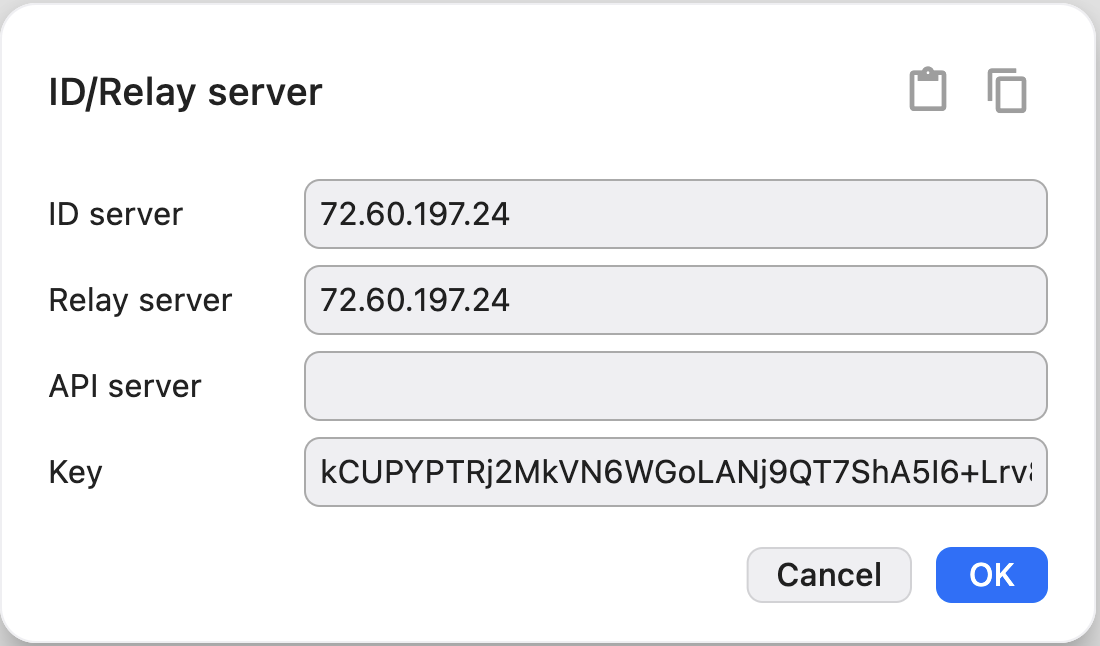
- Open RustDesk, then click the menu button (⋮) next to your ID.
- Select Network → click Unlock network settings (enter your Mac password).
- In the ID server field, enter:
72.60.197.24 - In the Relay server field, enter:
72.60.197.24 - In the Key field, paste:
kCUPYPTRj2MkVN6WGoLANj9QT7ShA5I6+Lrv8wEYESQ= - Leave API server blank and click OK.
- Restart RustDesk. The status should now show "Ready".
Already have RustDesk installed?
Configure it to use our secure server:
ID Server
72.60.197.24
Relay Server
72.60.197.24
Key
kCUPYPTRj2MkVN6WGoLANj9QT7ShA5I6+Lrv8wEYESQ=